# Robin Goudeketting — Full Content Archive > Full markdown of every blog post on goudeketting.nl, newest first. Concatenated for LLM ingestion. The companion index at https://goudeketting.nl/llms.txt lists titles and blurbs only. Site: https://goudeketting.nl Posts: 15 Generated: 2026-04-24T05:55:52.016Z --- # What Can You Actually Build With a Rapid Prototype? URL: https://goudeketting.nl/posts/2026/04/24/what-can-you-build-with-a-rapid-prototype Date: 2026-04-24 Tags: rapid prototyping, mvp development, startup web app, prototype a business idea, ruby on rails, founders Reading time: 6 min > Rapid prototyping isn't a buzzword. Here are real examples of what a developer can build in days or weeks, before you commit to a full product. **TL;DR:** Rapid prototyping lets non-technical founders validate a business idea with a working piece of software, without building the full product first. In days or weeks, a developer can build a functional booking tool, a data dashboard, a lead qualification workflow, or a client portal. The goal isn't polish. It's proof that the idea works, so you can decide whether to invest further with real evidence rather than assumptions. The most common thing I hear from non-technical founders before we start working together is some version of: "I don't want to spend €20,000 on something nobody wants." That's a completely reasonable fear, and it's exactly the problem rapid prototyping is designed to solve. But "rapid prototyping" is one of those phrases that sounds reassuringly professional while meaning almost nothing to someone who hasn't seen it in practice. So instead of explaining the concept, let me show you what it actually looks like. ## What a Prototype Is (and Isn't) A prototype is a working piece of software that does one or two things well enough to test with real people. It's not a mock-up in Figma. It's not a landing page with a waitlist form (though that has its place). And it's definitely not a finished product with a polished UI, a marketing site, and a payment integration. It's functional and fast to build. Its whole shape is decided by the single question you're trying to answer, which is usually: "Will people actually use this?" The tools I reach for most often are Ruby on Rails for the back-end and either plain Hotwire or a lightweight React front-end depending on how interactive the thing needs to be. Rails especially earns its keep here, because the convention-over-configuration approach means you're not making a hundred setup decisions before writing a single line of actual product logic. I've written more about [why Rails is still the right call for MVPs](/posts/rails-for-rapid-prototyping) if you want the longer version. ## Real Examples of What Gets Built ### A Booking and Scheduling Tool One of the most common requests I get from small service businesses is some version of: "I'm managing all my bookings over WhatsApp and I'm losing my mind." A prototype for this is usually a simple web app where customers can select a time slot, fill in a short form, and get a confirmation email. The business owner gets a basic admin view showing upcoming bookings. That's it. No Stripe integration yet. No automated reminders. No customer accounts. Just: does the core loop work, and does it save the owner time? Built in Rails with Action Mailer for the emails, this kind of thing takes roughly a week. If clients start using it and the owner stops losing bookings, you've validated the idea. Then you decide what to build next. ### An Internal Data Dashboard A client came to me with a folder full of Excel files that three people were updating separately, emailing back and forth, and regularly overwriting each other's work. The prototype was a simple web dashboard: a shared interface where the same data lived in one place, could be filtered and sorted, and where each user had a login so you could see who changed what. No fancy analytics. No integrations. Just the data, visible, editable, and not broken every time someone saved over the wrong version. This is a case where even a rough prototype makes a dramatic difference immediately, because the before-state is so painful. It also tends to reveal, quickly, what the team actually needs next, which you can't always know in advance. The longer version of this diagnostic is in [when Excel is enough](/posts/when-excel-is-enough). ### A Lead Qualification Workflow A founder I worked with was spending two hours a day doing initial intake calls that filtered out 80% of leads before anything interesting happened. The prototype was a multi-step form that walked potential clients through a series of qualifying questions, scored their responses, and either booked a call automatically or sent them a polite "not quite the right fit" email. The logic wasn't complicated. The form was built with a bit of Stimulus for the step-by-step flow and a simple scoring table in the database. But the founder went from two hours of intake calls per day to about twenty minutes, within a week of going live. That's the thing about prototypes for workflow problems. You don't need to solve the whole problem. You need to solve the expensive part. ### A Client-Facing Portal Agencies and consultants often manage client work through a combination of email threads, shared Google Drives, and the occasional Notion page someone forgot to update. A prototype client portal is typically a simple authenticated web app where clients can log in, see the status of their project, upload files, and leave comments. Not beautiful, not feature-complete. But it replaces the email thread. That alone is usually enough to prove the value. ## A Scenario That Comes Up More Than You'd Think Someone has a niche B2B idea. They've talked to ten potential customers and they all said "yes, I'd pay for that." The founder wants to know whether to hire a development agency and spend €40,000 building it properly. My usual answer: not yet. Build a prototype first. Specifically, build the one screen or the one workflow that represents the main value of the product. Let five of those ten customers actually use it, even if it's rough around the edges and you're manually handling some things behind the scenes that will eventually be automated. If they use it and find it valuable, you have real signal. If they don't, you've learned something important for a fraction of the cost. The "yes I'd pay for that" conversation is useful, but it isn't the same as watching someone actually reach for their wallet. This approach has a name in lean startup circles. It's sometimes called a "concierge MVP," where you manually handle back-end operations while the user interacts with a simple front-end. Unglamorous, but it works. For the fuller argument on scoping, see [what an MVP actually is](/posts/what-is-an-mvp). ## Timelines You Can Realistically Expect A focused prototype with a clear scope (one primary workflow, basic authentication, and a simple admin view) is typically a one to three week project. That assumes the requirements are reasonably well-defined going in, which is worth spending a day or two on before writing any code. The scope creep risk is real. "Can we just add..." is the phrase that turns a two-week prototype into a two-month one. The discipline of keeping a prototype small isn't just about saving money. It's about keeping the feedback loop short enough to be useful. What you get at the end isn't something you'd necessarily show to investors as a finished product. But it's something real people can use, that proves a real workflow, with real data. That's worth more than a slide deck. --- *If you have a business idea you want to test before committing to a full build, I can help you scope and build a prototype that answers the right questions quickly. [Get in touch](/#contact) and we can talk through what that looks like for your specific situation.* --- # The Rise of the Vibe Code Cleanup Specialist URL: https://goudeketting.nl/posts/2026/03/10/vibe-code-cleanup-specialist Date: 2026-03-10 Tags: tech debt, psychology, productivity, software development, technical leadership, momentum Reading time: 2 min > A new category of developer is emerging: specialists who clean up AI-generated applications. It may signal something deeper about how software is being built. **TL;DR:** AI has lowered the barrier to building software, but not the cost of making it maintainable. The rise of “AI cleanup specialists” may reflect a real shift in development workflows—or a temporary market inefficiency. Over the past few months, I’ve noticed a new positioning trend on LinkedIn. Developers are branding themselves as “AI code cleanup specialists,” “vibe code fixers,” and similar variations. Their pitch is simple: you built an app with ChatGPT, Claude, Bard, or Grok—now they’ll make it production-ready. The irony is obvious. We’ve spent decades automating manual tasks, and now we’re creating manual jobs to fix our automation. Developers are making a living cleaning up after tools that were supposed to make development faster and easier—tools that are often framed as replacements for developers altogether.[^1] It’s easy to dismiss this as absurd. But something more interesting may be happening. Some platforms are formalizing this positioning. For example, [CriticCode](https://critic.codes) markets itself specifically around reviewing and improving AI-generated codebases, turning raw outputs into something closer to production quality. ## The Case For It There’s a credible argument that this dynamic democratises software creation. AI tools dramatically lower the barrier to entry. A founder with a business idea but limited technical skill can now produce a functional prototype in hours instead of months. That alone changes who gets to experiment. Cleanup specialists then act as a second stage in the pipeline—bridging the gap between “good enough to validate an idea” and “robust enough for real users.” In that model, AI handles rapid exploration; experienced developers handle hardening, security, architecture, and maintainability. This division of labour could unlock meaningful value. Many ideas historically died not because they were bad, but because the cost of prototyping was too high. If AI reduces the initial cost and specialists professionalise the result, more experiments reach the market. That’s a legitimate structural shift. ## The Case Against It The friction appears when economics enter the picture. **1. The cost expectations don’t align.** AI generation feels cheap and fast. Cleanup rarely is. Untangling AI-generated code can take hours or days, and sometimes requires rewriting large portions entirely. Clients anchored to the perceived “low cost” of AI often expect expert-level quality at a fraction of traditional pricing. That mismatch is hard to sustain. **2. It risks normalising low-quality first drafts.** If the assumption becomes “someone else will fix it later,” incentives shift. Generation speed is rewarded; architectural rigour is deferred. That creates downstream inefficiency by design. **3. Information asymmetry increases.** Most non-technical founders cannot meaningfully evaluate whether a cleanup improved system integrity or simply rearranged complexity. That makes pricing and trust difficult on both sides. **4. Lifecycle costs may increase, not decrease.** Quick patches on weak foundations rarely eliminate technical debt; they redistribute it. Over time, maintenance, feature expansion, and onboarding become more expensive. What appears cheaper upfront—AI generation plus cleanup—may cost more across the product’s lifespan. **5. The junior developer pathway narrows.** AI-generated code is often syntactically correct and well-commented, but structurally overcomplicated. A single function may look reasonable. At application scale, however, the interconnectedness becomes difficult to reason about. Cleanup then requires mid- to senior-level developers who can restructure systems holistically. The simpler, well-scoped maintenance tasks that once helped junior developers build competence may become less common. ## Who Actually Does This Work? Two archetypes seem likely to emerge. **AI-native specialists** understand how models tend to structure code, where they introduce subtle security gaps, how they mishandle state, or where they over-engineer abstractions. Their value lies in pattern recognition across AI failure modes. **Rebranded generalists** are experienced developers who already do debugging, refactoring, and architectural cleanup. The only difference is the framing. “AI remediation” may simply be a more marketable label for work that always needed to be done but was historically underfunded. If the second group dominates, something else is happening: AI may be functioning as a narrative catalyst. Companies that never budgeted for systematic code review might suddenly allocate funds when problems are attributed to AI rather than to normal software entropy. In that case, the market isn’t purely about AI, it’s about reframing technical debt in a way decision-makers finally take seriously. ## A Broader Shift If this trend persists, it suggests a modified development workflow: **Generate → Refine → Optimize** Traditional software models emphasised deliberate planning before implementation. AI compresses the exploration phase, encouraging rapid generation first and structured correction second. That may not be inherently flawed. Many industries iterate this way. The risk lies in mistaking generation for completion. ## What This Really Signals The most interesting possibility is not that AI creates messy code. Human developers have always done that. The difference is velocity. AI increases the rate at which code enters existence. More code, created faster, with lower upfront friction. That amplifies both experimentation and entropy. Cleanup specialists may simply be the market’s response to that acceleration. Whether this becomes a stable specialisation depends on one question: do businesses ultimately build better products faster with this two-stage approach, or do they accumulate technical debt with extra steps? What’s clear is that AI hasn’t eliminated the need for skilled developers. It has shifted when and how their expertise is applied. --- *Have you seen this positioning in your network? Is there sustained demand for it, or is it mostly marketing language?* ## Footnotes [^1]: Jensen Huang (Nvidia CEO) claims coding as a career might be dead. https://www.windowscentral.com/software-apps/nvidia-ceo-says-the-future-of-coding-as-a-career-might-already-be-dead --- # What Is an MVP and Do You Actually Need One? URL: https://goudeketting.nl/posts/2026/03/06/what-is-an-mvp Date: 2026-03-06 Tags: mvp, startup development, rapid prototyping, web app, product strategy, founders Reading time: 6 min > MVP gets thrown around constantly in startup circles. But what does it actually mean in practice, and do you need one before you can launch? **TL;DR:** An MVP is the smallest version of your product that lets real users do the core thing you're promising them. It's not a rough draft of everything — it's a finished version of one thing. Most first-time founders either build too much before launching or confuse a landing page with a product. Knowing which trap you're in, and when to hire someone to help you build, saves you months and thousands of euros. MVP gets thrown around so often in startup conversations that it's started to lose meaning. Investors say it. Accelerators say it. That one friend who read a Paul Graham essay says it. And yet most first-time founders I talk to are still genuinely unclear on what a minimum viable product actually is, and more importantly, what it isn't. So let me give you the practical version. ## What an MVP Actually Is An MVP is the smallest thing you can build that lets a real user accomplish the core job your product promises to do. Not a sketch. Not a pitch deck. Not a beta with a waiting list. An actual working thing someone can use. The "minimum" part doesn't mean low quality. It means ruthlessly scoped. You're not building every feature, you're building the one feature that proves your idea has legs. Everything else comes later, once you've confirmed that the core problem is real and that people will actually pay (or return) to solve it. Eric Ries, who popularised the term in The Lean Startup, defined it as a vehicle for learning. That framing matters. The point of an MVP is not to launch a product. The point is to test an assumption as cheaply and quickly as possible. ## What It Isn't Here's where most people go wrong: they either build too much or too little, and both mistakes are expensive. Building too much looks like this. You spend six months and €30,000 getting a full platform built with user accounts, a dashboard, filters, notifications, an onboarding flow, and a mobile-responsive design, before a single person has told you they want the thing. That's not an MVP. That's a product launch with no validation. Building too little on the other hand: you put up a landing page, collect some email addresses, and call it validated. A landing page tells you whether people are curious. It does not tell you whether they'll use or pay for what you're building. There's a real difference. A real MVP sits between those two extremes. It's functional enough to deliver actual value, and scoped tightly enough that you could build it in weeks, not months. ## Should You Build One, or Validate First? Before you commission any development work, it's worth asking an honest question: can you validate your assumption without building anything? For some ideas, the answer is yes. If you're building a service business with a tech layer on top, you might be able to run the first ten clients manually — using spreadsheets, email, and calendar invites — before you automate anything. This is sometimes called a "concierge MVP," and it's a legitimate approach when the manual version is actually feasible. Then over time, you can [convert those spreadsheets](/posts/2026/02/25/when-excel-is-enough) into the foundation for your actual application. But for a lot of software ideas, you can't fake the core experience. If your product is a tool people use to do something, they need to be able to use it. In those cases, you do need to build something and the question becomes how little you can build while still proving the point. ## When to Hire vs. DIY If you're non-technical, you have three realistic options: use a no-code tool, hire a developer, or find a technical co-founder. Each has its place. No-code tools are genuinely useful for simple MVPs. Large language models like Claude can build more and more features reliably and can actually make decent MVPs. Alternatively, using WebFlow or Bubble, you can make simple CRUD apps or form-heavy applications. If your product concept is straightforward and you're comfortable learning a new platform, it's worth exploring before you spend money on custom development. The trade-offs are real (limited flexibility, harder to scale) but for pure validation purposes, they often don't matter yet. Hiring a developer makes sense when the core interaction is technically complex, when you have a clear enough idea of what you need, and when you've already done some form of manual validation. The worst time to hire a developer is when you're still figuring out what to build, that's expensive in both time and money. What I'd flag from experience: the founders who get the most out of MVP development have done the thinking beforehand. They know who the user is, what the one core action is, and what success looks like after six weeks. When that clarity exists, a good developer can move very fast. When it doesn't, you'll spend half your budget in back-and-forth. ## How Lean Should It Actually Be? There's no universal answer, but here's a practical heuristic: if you're embarrassed by how little it does, you're probably in the right zone. If you're proud of how polished it looks, you've probably over-built. For most B2B tools or internal workflow apps, an MVP should cover one user flow end-to-end, handle the happy path reliably, and not crash. That's genuinely enough to start learning. Authentication, admin panels, email notifications, analytics dashboards, most of that can come later once you know the thing is worth investing in. The tech stack matters less than people think at this stage. What matters is that whoever builds it can move quickly and doesn't over-engineer it. I default to Ruby on Rails for MVP work because the [speed-to-functionality ratio is hard to beat](posts/2025/05/13/rails-for-rapid-prototyping), but the right tool depends on what you're building and who's going to maintain it afterward. ## The Question Worth Asking Before you write a brief, start a no-code project, or talk to a developer, try to answer this in one sentence: what is the single action my user needs to be able to complete, and how will I know if it worked? If you can answer that clearly, you're ready to build an MVP. If you can't, spend another week on that question first. It'll save you more time than anything else I've mentioned here. --- *If you're at the stage where you know what you want to build but aren't sure how to scope it or who to build it with, I'm happy to talk it through. [Get in touch](/#contact) and we can figure out whether your idea needs a week of no-code, a focused MVP build, or something in between.* --- # When Excel Is Enough (And When It Isn't) URL: https://goudeketting.nl/posts/2026/02/25/when-excel-is-enough Date: 2026-02-25 Tags: excel, google sheets, web app, internal tools, business tools, decision framework Reading time: 7 min > Most businesses run on spreadsheets longer than they should. Some run on them longer than they need to. Knowing the difference saves you time, money, and a lot of frustration. **TL;DR:** Excel is genuinely the right tool for a lot of situations — and the wrong tool for a few specific ones. The problems that signal you've outgrown it are surprisingly consistent across businesses: the sheet gets slow, multiple people need access at once, different people need to see different things, or data integrity starts costing you money. Understanding which problem you actually have determines whether you need a better front-end on top of your data, or a proper web application underneath it. Most businesses run on spreadsheets. Invoices, client lists, project trackers, inventory, hiring pipelines, if it involves rows and columns, it probably lives in Excel or Google Sheets. And for a long time, that's fine. The problems start when it stops being fine, and nobody quite notices until something breaks. This article is about recognising which situation you're in. Excel is genuinely the right answer more often than software vendors would like you to believe, but there are specific failure modes that are consistent across businesses, and once you hit them a spreadsheet stops solving your problem and starts being your problem. ## When Excel Is Actually the Right Answer Before diagnosing failure, it's worth being honest about what Excel does well. It's flexible, fast to set up, requires no IT involvement, and most of your team already knows how to use it. If your data structure is simple and your team is small, a well-built spreadsheet is a legitimate business tool, not a stepping stone. The clearest case for staying in Excel is when you already have in-house expertise and a properly structured setup. If someone on your team understands how to build and maintain spreadsheets properly and you have someone who can write VBA to automate repetitive work and build lightweight interfaces on top of your data, Excel can carry a surprising amount of weight. Some businesses have built genuinely sophisticated internal tools this way, and there's no reason to replace something that works well. The key condition is that last one: *internal*. The moment a client, supplier, or anyone outside your team needs to see or interact with some of the data, you've crossed into territory Excel wasn't designed for. Of course you can work with hidden columns and hidden sheets, but that gets confusing and fragile quickly. Until then, it's a reasonable choice. ## The One-Giant-Table Problem Most spreadsheet problems trace back to the same root cause: most people don't think in terms of data structure. They think in terms of the answer they want to see: a report, a summary, an overview. They build the spreadsheet to look like that answer rather than to store the underlying data cleanly. The result is one giant table that does everything: customer names, order history, payment status, contact details, notes, and calculated totals, all in the same rows. It works when the business is small. Then it gets slower. Then it gets bigger. Then someone adds a column and breaks three formulas. Then two people edit it at the same time and one of them loses their work. The slowness isn't really about file size. It's a symptom of a structural problem — data that was never organised properly to begin with. A well-architected spreadsheet has separate tables for separate things, just like a proper database would. The difference is that most people building spreadsheets have never thought about it that way, and nobody told them to. ## The Five Signs You've Outgrown It Across different industries and business sizes, the same failure modes appear. They're not subtle once you know what to look for. ### The sheet is slow. If opening the file or making a calculation takes noticeable time, that's an important symptom. The root problem is usually a spreadsheet that's doing too much. Storing, calculating, and displaying data all in the same place, with no proper separation. ### Multiple people need access at the same time. This is where Excel breaks hardest. Version conflicts, someone working on a stale copy they downloaded last Tuesday, one person locking the file while three others wait. These aren't edge cases. They're what happens every week in businesses that have grown past a handful of people. Google Sheets reduces this friction significantly, though it introduces its own issues. Not to mention the desire of many companies to not store their data on Google's services. ### Different people need to see different things. This is another case that represents a tough nut to crack. Imagine you have clients who need to see only their own data, employees who work with everything, and managers who need to edit and approve. In Excel, enforcing that requires hidden columns, separate tabs, manual copying, and a level of discipline that most teams won't maintain consistently. It's not a workflow problem. It's a structural limitation of the tool. ### You need to expose data to the outside world. The moment you want a client to interact with something, like fill in a form, check a status, or view a report, you've left spreadsheet territory. You can email exports, share view-only links, or build workarounds, but none of those are the same as giving someone a proper interface to the data they need. ### Data integrity is breaking things. This is the most expensive one, and it often takes a while to show up. In a spreadsheet, nothing stops someone from entering text in a column that should only contain numbers, deleting a row that other rows depend on, or accidentally overwriting a formula. Small errors accumulate quietly. The moment they surface — in a client invoice, a financial report, a stock count — they've usually already cost money. Not in dramatic amounts, but consistently and invisibly. ## The Middle Ground: Is There Something Between Excel and a Full Web App? Yes, and it's worth understanding honestly. Tools like Power BI can sit on top of a spreadsheet and give multiple users concurrent read access with proper filtering and dashboards. Microsoft's Copilot Studio can deploy an AI agent on top of a workbook. If Excel is properly architected with a relational database underneath it, it can behave more like a real application. These approaches work when you have in-house technical expertise to build and maintain them, and when your requirements stay relatively stable. They're not the right answer when you need client-facing access, role-based permissions that need to be enforced rather than trusted, or a system that will be used by people who aren't technically comfortable. The hidden cost of these solutions is maintenance — they're not simpler than a web app, they're just built in familiar tools. When something breaks, the person who built it needs to fix it, and that person often isn't there anymore. ## When You Actually Need a Web App A proper web application becomes the right answer when you need any of the following. When **different people genuinely need access to different data**, and that access needs to be enforced, not trusted. Role-based permissions that actually work — not hidden columns that anyone can unhide — require a proper backend. When **clients or external parties need to interact with your data**. Not view a PDF export, not receive an emailed spreadsheet, but actually see their own information and potentially update it. When **data integrity is non-negotiable**. A web application validates data before it's saved. A spreadsheet trusts whatever someone types. If incorrect data costs you money — through wrong orders, bad invoices, incorrect reports — you need something that enforces correctness at the point of entry. When **your team has grown past the point where collaboration in a shared file is viable**. Not just a larger team, but a team where different people have different workflows, different needs, and different levels of access. The deciding question is simple: are the problems you're experiencing about the *tool*, or about *how you're using the tool*? If your spreadsheet is slow because it's poorly structured, rebuilding it might solve the problem. If multiple people need simultaneous access with different permissions and your clients need a view into the data, no amount of spreadsheet improvement will fix that. Those are architectural requirements, and they need an architectural solution. ## A Simple Test Ask yourself three questions. Do external parties — clients, suppliers, anyone outside your organisation — need to access or interact with this data? If yes, you need a web application. Do different internal users need to see fundamentally different things, and does it matter if someone sees data they shouldn't? If yes, you need proper role-based access control, which means a web application. Has incorrect data in this system ever cost you money, caused a client problem, or led to a wrong decision? If yes, and if the answer happened more than once, you need data validation at the point of entry — which spreadsheets don't provide. If you answered no to all three, the honest advice is to look at your spreadsheet structure first. A well-built spreadsheet with clean, separated tables can handle more than most people expect. If you answered yes to any of them, you've identified the actual problem — and it's not one that a better spreadsheet will solve. --- *If you're not sure which category your situation falls into, a short conversation usually makes it clear. [Get in touch](/#contact) and we can work through it.* --- # How to Audit a Website: A Practical Guide URL: https://goudeketting.nl/posts/2026/01/27/how-to-audit-a-website Date: 2026-01-27 Tags: website audit, technical SEO, performance, web development, business optimisation Reading time: 15 min > Your website has probably been live for a few years. It's been updated by different people, migrated at least once, and has plugins or features nobody remembers adding. It works, mostly, but you suspect it could be doing better. **TL;DR:** A website audit identifies accumulated technical problems—performance, SEO, UX, and security issues—that quietly compound into lost traffic and revenue. The value isn't in finding problems (tools do that easily) but in knowing which ones actually cost you business and prioritising ruthlessly by impact. Run audits periodically, fix high-impact issues first, and monitor results. Your website has probably been live for a few years. It's been updated by different people, migrated at least once, and has plugins or features nobody remembers adding. It works, mostly, but you suspect it could be doing better. A website audit tells you what's actually happening under the hood and more importantly, which problems are worth fixing. ## What Is a Website Audit? A website audit is a systematic review of your site's technical health, performance, and effectiveness. Think of it like a diagnostic check for your car: you're looking for issues that are costing you now, issues that will cost you later, and things that are fine to leave alone. The term covers a lot of ground. Performance audits measure how fast your site loads, SEO audits examine how search engines see your pages, UX audits evaluate how real humans experience your site, and security audits check for vulnerabilities. Most businesses need a combination of this and most audits also will consist of elements from each of these, because these categories overlap in practice. A slow site is both a performance problem and an SEO problem. A confusing checkout flow is both a UX issue and a revenue issue. Understanding these overlaps is key to knowing why websites need audits in the first place. ## Why Websites Need Audits Websites decay. Not dramatically, i.e. they don't crash overnight. They do, however, accumulate small problems that compound into significant drag on your business. Consider what happens over three years of normal operation. A page that loaded in 2 seconds when you launched now takes 4 seconds because of added tracking scripts, larger images, and installed plugins. That extra 2 seconds costs you roughly 7% of conversions, according to Google's research on page speed and user behaviour.[^1] Meanwhile, title tags that were fine when you launched are now generic compared to competitors who've optimised theirs. You're ranking position 8 instead of position 3, which means roughly 75% less organic traffic to that page. And somewhere along the way, a contact form that works perfectly on desktop started breaking on certain mobile browsers. You don't know because you don't use those browsers. Neither does anyone on your team. None of this shows up as an emergency. The cumulative effect on the other hand, is a site that's working against you instead of with you. An audit surfaces these issues and helps you prioritise which ones actually matter. To understand what an audit looks for, it helps to know how websites actually work under the hood. ## The Mechanics of Performance When someone visits your website, their browser makes a request to your server. The server responds with HTML, which the browser starts parsing. As it parses, it discovers additional resources it needs to request from the server; stylesheets, JavaScript files, images, fonts, etc. Only after enough of these resources have loaded and been processed can the browser render something useful on screen. Performance audits measure how efficiently this process happens, and the metrics that matter most are [Google's Core Web Vitals](https://developers.google.com/search/docs/appearance/core-web-vitals){:target="_blank"}, because Google uses them as ranking factors and because they correlate with user experience. Beyond Core Web Vitals, server response time (Time to First Byte) tells you whether your hosting infrastructure is a bottleneck, total page weight tells you how much data visitors have to download, and number of requests tells you how many round trips (request-response cycles) the browser needs to make. All of these contribute to the overall experience of "this site feels fast" or "this site feels slow." However, speed is only part of the picture. A fast site that search engines can't find properly is still a site that's underperforming. ## How Search Engines See Your Site Search engine optimisation has a reputation for being mysterious and I would agree. Google is a black box and you do not know how they value what, but the technical side is actually quite straight forward. Search engines send automated crawlers to visit your pages, follow links, and build an index of what exists on the web. When someone searches, the engine consults this index and returns results ranked by relevance and quality. Technical SEO problems interfere with this process at different stages, and understanding where the breakdown occurs determines how you fix it. You hear often about crawlability and indexability[^2], but I would add a third part: on-page factors. Crawlability problems prevent search engines from finding your pages in the first place. Broken or inconsistent internal linking means crawlers can't navigate your site effectively, misconfigured robots.txt files might accidentally block pages you want indexed, and orphan pages with no internal links pointing to them often go undiscovered entirely. Indexability problems prevent pages from appearing in search results even after crawlers find them. An accidental noindex tag tells Google not to list a page, duplicate content confuses the engine about which version to show, and canonical tag errors can point Google to the wrong URL. These issues are invisible to regular visitors but completely change how search engines treat your content, which is why they're easy to miss without a proper audit. Once your pages are crawlable and indexable, on-page factors affect how well you rank. Your title tag is the most important single element. It appears in search results and tells both engines and users what the page is about. A title that says "Home - Company Name" provides no information about what you offer. Headings structure your content and signal what's important. Meta descriptions don't directly affect ranking but do affect whether people click through to your site. Schema markup helps search engines understand your content well enough to display rich results like star ratings, event times, or product prices as well as what the role of the page and your organisation is. Site architecture (how your pages are organised and linked together) affects how authority flows through your site. A page buried four clicks deep from your homepage will generally rank worse than a page one click away, all else being equal. Technical SEO is measurable and mechanical, but user experience requires a different kind of evaluation. ## User Experience Beyond the Numbers Automated tools can measure page speed and flag missing alt tags, but they can't tell you whether your site is actually pleasant to use. That requires human judgement. The most important UX question is whether people can accomplish their goals; if someone visits your site to buy a product, can they find it, understand it, and purchase it without friction? If they want to contact your sales team, is the path obvious? If they need specific information, can they locate it within a few clicks? Mobile experience deserves special attention because it's where most problems exist. Responsive design that technically works often fails in practice. E.g. forms designed for desktop become frustrating on phones, tap targets that seem fine on a large screen become impossible to hit accurately on a small one, and text sized for monitors requires zooming on mobile devices. The only way to find these issues is to actually use your site on a phone, not a simulation, but a real device held in your hand. Accessibility overlaps with usability here: can someone navigate your site using only a keyboard? Can screen readers interpret your content correctly? Is there sufficient colour contrast for people with visual impairments? The [Web Content Accessibility Guidelines (WCAG)](https://www.w3.org/TR/WCAG21/){:target="_blank"} provide standards, but the underlying principle is simple: your site should work for everyone who wants to use it. Jakob Nielsen's usability heuristics[^3] offer a useful framework for evaluation: Does your site provide clear feedback when users take actions? Does it use language your audience understands rather than internal jargon? Can users recover easily from mistakes? Are similar functions consistent throughout? These aren't metrics you can automate, they require walking through your site as a user would and noting where things feel confusing, slow, or broken. The same human judgement applies to security, though the stakes are different. ## Security Considerations Security audits check whether your site is vulnerable to attack, and the basics matter most. Is your SSL certificate valid and properly configured? Is your CMS and all its plugins updated to versions without known vulnerabilities? Are sensitive directories and files protected from public access? Beyond the basics, security headers tell browsers how to handle your content safely. A Content Security Policy restricts what scripts can run on your pages, defending against injection attacks. Missing security headers are low-hanging fruit that many sites neglect. If you're handling sensitive data, like customer information, payment details, login credentials, the stakes are higher. Form vulnerabilities like SQL injection[^4] and cross-site scripting (XSS)[^5] can expose your database or your users to attack, making professional penetration testing worth the investment. But most business websites have more mundane security gaps: outdated WordPress installations, plugins that haven't been updated in years, admin URLs that are exposed and guessable. These are the issues a standard security audit catches. Once you understand what audits measure, the next question is how to actually run one. ## Running an Audit: Tools and Process The good news is that most of the tools you need are free. For performance, [Google PageSpeed Insights](https://pagespeed.web.dev/){:target="_blank"} runs a Lighthouse audit on any URL and shows both lab data (controlled test conditions) and field data (real user experiences from Chrome). [GTmetrix](https://gtmetrix.com/){:target="_blank"} and [WebPageTest](https://www.webpagetest.org/){:target="_blank"} provide detailed waterfall charts showing exactly what's loading and when. For any performance tool, test your homepage, your highest-traffic pages, and any page where conversions happen—and always test mobile, where performance is typically worse. For SEO, [Screaming Frog's SEO Spider](https://www.screamingfrog.co.uk/seo-spider/){:target="_blank"} is the industry standard. It crawls your site like a search engine would, finding broken links, duplicate content, missing tags, redirect chains, and structural issues. The free version handles sites up to 500 URLs. [Google Search Console](https://search.google.com/search-console/){:target="_blank"} shows you how Google actually sees your site: which pages are indexed, which have errors, and what search queries bring traffic. Paid tools like [Ahrefs](https://ahrefs.com/){:target="_blank"} and [Semrush](https://www.semrush.com/){:target="_blank"} add competitive analysis and backlink auditing, useful but not essential for a basic technical audit. For UX and accessibility, the [WAVE browser extension](https://wave.webaim.org/){:target="_blank"} flags accessibility problems as you browse, and [Google's Mobile-Friendly Test](https://pagespeed.web.dev/){:target="_blank"} checks basic responsive design, but real UX issues require manual review, walking through your key user journeys and noting where things feel wrong. For security, [Mozilla Observatory](https://observatory.mozilla.org/){:target="_blank"} grades your security headers and SSL configuration, [OWASP ZAP](https://www.zaproxy.org/){:target="_blank"} scans for common web application vulnerabilities, and [WPScan](https://wpscan.com/){:target="_blank"} checks for known WordPress plugin and theme vulnerabilities if that's your platform. There are many tools and looking into all of them takes time, that's the reason there are professionals doing these audits. That being said, the process matters as much as the tools. Start by defining what success looks like for your site. What actions do you want visitors to take? Then audit with those goals in mind. A slow page that nobody visits matters less than a moderately slow page that drives sales. A missing meta description on a blog post from 2019 matters less than missing structured data on your product pages. This leads to the hardest part of any audit: deciding what to actually fix. ## What Audits Typically Uncover Patterns emerge across different sites and industries. Performance issues almost always involve images: unoptimised photos often account for 50-80% of total page weight[^6]. Render-blocking resources, where the browser waits for CSS and JavaScript to load before showing content, are nearly universal. Third-party scripts accumulate over time: analytics, chat widgets, marketing tags, social embeds, each adding weight and latency. SEO issues cluster around metadata and structure. Just to give a few examples of things that I have encountered over the years. - Title tags are often too generic or duplicated across pages. - H1 headings are absent or don't describe the page content. - Meta descriptions provide no reason to click through. - Internal links are broken or inconsistent. - Schema markup is missing or incorrectly implemented. These aren't complex problems. They're the kind of thing that accumulates when sites grow without regular review. UX issues often trace back to mobile: - Forms have fields too small to tap accurately. - Buttons that work with a mouse fail with a finger. - Text requires zooming. - Pop-ups are impossible to dismiss on a small screen. These problems persist because the people building and testing sites typically use desktops. Security issues frequently involve neglected maintenance. The CMS was never updated, plugins have known vulnerabilities that were never addressed, admin URLs are exposed and guessable. HTTPS is enabled but leaking mixed content warnings. None of this is sophisticated, it's just forgotten. An audit will surface dozens of these issues. You can't fix everything at once, and you shouldn't try. Automated tools are especially prone to overwhelming you. Screaming Frog might flag 200 "issues" on a medium-sized site, but maybe 20 of them actually matter and maybe 5 are urgent. The diagnostic skill isn't just finding problems, it's knowing which problems are actually costing you business. ## The Prioritisation Problem Impact should drive prioritisation. A slow checkout page matters more than a slow About page because one directly affects revenue and the other doesn't. A broken contact form matters more than a missing alt tag because one prevents leads and the other is a minor accessibility issue. Frame every problem in terms of business outcomes: traffic, conversions, revenue, risk. Effort matters too; some fixes take five minutes (compressing an image, adding a missing title tag, fixing a broken redirect) while others require significant development work (rebuilding page templates, refactoring JavaScript, migrating hosting infrastructure). Quick wins deserve priority when their impact is reasonable. A useful framework: plot issues on a grid with impact on one axis and effort on the other. High impact, low effort issues are your immediate priorities. High impact, high effort ones go on the roadmap. Low impact issues get deprioritised or ignored entirely, regardless of how easy they are to fix. This sounds obvious in theory, but it's where most organisations struggle. The temptation is to fix easy things first, or to fix whatever the loudest tool flagged, or to try to achieve a perfect score on some metric that doesn't actually affect business outcomes. Disciplined prioritisation is what separates audits that produce results from audits that produce reports nobody acts on. ## The Methodology in Practice Last year I ran an SEO audit for [Danküchen](https://dan.at/){:target="_blank"}, Austria's market-leading kitchen manufacturer. What I found wasn't unusual: dozens of small technical issues, none of them urgent on their own, all of them compounding into significant lost visibility. This is the kind of quiet accumulation that happens to every website over time. Pages get added by different people with different standards, redesigns preserve some legacy problems while introducing new ones, teams change and institutional knowledge about site structure fades. Nobody is actually doing anything wrong. The audit followed the methodology I've described: crawl the site to identify structural and technical issues, benchmark current performance against competitors and best practices, categorise issues by type and severity, then, and this is the part that matters most, prioritise ruthlessly based on which fixes would actually move the needle. The fixes themselves weren't exotic: title tag optimisation, heading structure cleanup, meta description improvements, schema markup additions. What made the difference was knowing where to look and understanding which issues among the hundreds flagged were actually costing visibility. After implementing the fixes, multiple keywords moved into the top 3, including "küchen österreich" to #1. SEO involves many factors, so I won't claim sole credit, but the results are clear. The takeaway isn't about any specific tactic. It's that the same diagnostic approach applies whether you're auditing for SEO, performance, UX, or security: you're looking for accumulated problems that compound into lost business, then prioritising based on what will actually deliver results. ## When to Do It Yourself vs. Hire Help You can run a basic audit yourself using the tools I've described. This makes sense if you have technical staff who can interpret results, if your site is relatively simple, if you mainly need a health check rather than deep analysis, or if budget is tight. The tools are accessible and the learning curve isn't steep. Professional help makes sense when your site is complex: multiple subdomains, hundreds of pages, custom functionality that interacts in non-obvious ways. It makes sense when you need competitive analysis and strategic recommendations, not just a list of problems. It makes sense when your team doesn't have time to learn the tools and interpret results, or when the audit will inform a major investment like a redesign or platform migration. ## Common Failure Modes Treating the audit as a one-time event is the most common mistake. Websites change. Your hosting changes. Your competitors change. Google's algorithms change[^7]. The landscape that an audit captures is a snapshot, not a permanent record, and without periodic re-auditing or continuous monitoring, problems accumulate again. Over-relying on automated tools leads organisations to chase false positives while missing real issues. A tool might flag an image as "too large" when it's actually appropriately sized for its purpose, while the tool can't tell you that your checkout flow is confusing or that your value proposition is unclear. Human judgement remains essential. Trying to fix everything, or fixing things in the wrong order, wastes resources on low-impact changes while urgent issues persist. Perfect Lighthouse scores don't matter if your site doesn't convert. Metrics serve business goals, not the other way around. Ignoring mobile despite knowing better happens constantly. Organisations test on desktop because that's what they use, approve designs on desktop because that's how stakeholders review them, then act surprised when mobile users (more than half of typical web traffic)[^8] have problems. Avoiding these mistakes requires thinking about what happens after the audit is complete. ## Beyond the Audit An audit tells you what's wrong. What happens next determines whether the audit was worth doing. You need a prioritised action list with issues ranked by impact and effort, owners assigned, and deadlines set. You need technical resources to implement fixes; be that your existing developer, your agency, or a specialist. You need monitoring to verify fixes worked and catch new issues before they compound. You need follow-up after 30-60 days to measure results and adjust course. Sometimes an audit reveals that incremental fixes aren't enough. If the underlying technology is outdated, if the architecture is fundamentally broken, if technical debt has accumulated past the point of reasonable remediation, the efficient path forward might be [starting fresh](/posts/my-custom-blog-in-six-hours) rather than patching indefinitely. Sometimes the audit shows problems that aren't about the website itself. If your team is drowning in manual processes, managing data in spreadsheets that should be in proper systems, the fix is [building internal tools](/posts/guide-to-admin-dashboards) that actually support your workflow. And if you recognise the pattern I described at the start (accumulated small problems, knowing something's wrong but feeling paralysed about where to start) you're not alone. That [paralysis is common](/posts/psychology-of-tech-debt). The audit is the first step out of it. Then you prioritise ruthlessly. Then you fix one thing at a time. --- *Suspect your website has accumulated issues but not sure where to start? An audit surfaces what's actually costing you and what's fine to leave alone. [Let's talk](/#contact) about what a review of your site would involve.* [^1]: A 2016 study showing that 53% of mobile users abandon sites taking over 3 seconds to load, with each additional second costing roughly 7% in conversions. [Google Mobile Page Speed Study](https://www.marketingdive.com/news/google-53-of-mobile-users-abandon-sites-that-take-over-3-seconds-to-load/426070/) [^2]: Explanation of how search engines discover pages (crawlability) and decide whether to include them in search results (indexability). [Crawlability and Indexability Explained](https://www.seoworks.co.uk/crawlability-and-indexability/) [^3]: Ten general principles for interaction design, widely used as a framework for evaluating user interfaces. [Jakob Nielsen's 10 Usability Heuristics](https://blog.uxtweak.com/usability-heuristics/) [^4]: Introduction to SQL injection attacks, where malicious code is inserted into database queries through user input. [SQL Injection Basics](https://www.w3schools.com/sql/sql_injection.asp) [^5]: Overview of cross-site scripting (XSS), where attackers inject malicious scripts into web pages viewed by other users. [Cross-Site Scripting Basics](https://www.w3schools.com/cybersecurity/cybersecurity_web_applications_attacks.php) [^6]: Average image size on tested pages came out to around 1MB with total page weights were around 2MB. [Page weight](https://almanac.httparchive.org/en/2022/page-weight) [^7]: Unfortunately without warnings. [^8]: As of late 2024, mobile devices generate approximately 60-63% of global website traffic, having surpassed desktop in 2016. Regional variation is significant—North America and Germany still see roughly 45-50% desktop traffic, while regions like Africa and Asia exceed 70% mobile. [Statista Global Mobile Traffic Share](https://www.statista.com/statistics/277125/share-of-website-traffic-coming-from-mobile-devices/) --- # Admin Dashboards Explained: What They Are, Why You Would Need One, and How to Choose the Right Approach URL: https://goudeketting.nl/posts/2025/10/22/guide-to-admin-dashboards Date: 2025-10-22 Tags: admin dashboard, business operations, internal tools, web development, business management Reading time: 8 min > A practical guide for business owners and managers on understanding admin dashboards, evaluating when you need one, and choosing between off-the-shelf, low-code, and custom solutions. **TL;DR:** Admin dashboards centralise business operations and data access, solving operational efficiency and data fragmentation problems. Most businesses should start with off-the-shelf solutions, move to low-code platforms for customisation needs, and only build custom when requirements are genuinely specialised and the business case is clear. If you've ever juggled five different spreadsheets, toggled between multiple admin panels, or waited days for someone to pull a simple report, you've felt a pain that is screaming for a remedy. The remedy I'll be talking about today is 'Admin Dashboards'. These dashboards form a centralised control centre and have become essential tools for modern businesses. Understanding what they actually are and whether you need one isn't always straightforward. In this post, I try to cut through some of the confusion, explain what admin dashboards really do, when they make business sense, and how to evaluate your options for getting one. ## What is an Admin Dashboard? A dashboard is a very broad term. I'll try to get to the core of what I am talking about. In essence, an admin dashboard is a centralised interface that gives you control over your business operations, data, or both. A single place where authorised users can view analytics, manage content, control user permissions, process orders, or handle whatever operational tasks your business requires. But not all admin dashboards are created equal. There are different types of admin dashboards and understanding the different use cases helps clarify what you actually need: **Content Management System (CMS) Admin Panels** are what you get with platforms like WordPress or Shopify. These dashboards control your website content, product listings, and basic settings. They're standardised, widely understood, but limited to the platform's capabilities. **Custom Business Dashboards** are built specifically for your internal operations. These might track inventory across multiple warehouses, manage your client relationships, coordinate field service teams, or handle specialised workflows unique to your business. They're tailored to your exact needs but require investment to build. **SaaS Admin Interfaces** are what you use to manage customers or clients in your software product. If you run a subscription service or software platform, this is how you'd view user accounts, handle support issues, and manage billing (think Stripe). **Analytics and Business Intelligence Dashboards** focus primarily on data visualisation and reporting. Tools like Tableau and Power BI pull data from multiple sources to give you insights into performance, trends, and business health. These dashboards excel at turning complex datasets into understandable charts, graphs, and visualisations that help executives and analysts spot patterns and make strategic decisions. Unlike operational dashboards that control day-to-day tasks, analytics dashboards are built for understanding—answering questions like "How did we perform last quarter?" or "Which products are trending upward?"Retry The key distinction: some dashboards are about *controlling* things (managing users, processing orders, updating content), while others are about *understanding* things (viewing metrics, analysing trends). Many good admin dashboards do both. ## Why Your Business Needs an Admin Dashboard The case for admin dashboards comes down to three fundamental problems they solve: **Operational Efficiency**: When your team has to log into five different systems to complete one task, or when simple operations require technical knowledge, you're wasting time and hinder productivity. A well-designed admin dashboard consolidates these operations into a single, intuitive interface. Your team spends less time navigating systems and more time doing actual work. **Data-Driven Decisions**: Business data scattered across spreadsheets, email threads, and various platforms is effectively useless. Admin dashboards surface the information you need when you need it, ideally providing you with actionable insights. Instead of requesting reports and waiting for responses, you can see real-time metrics, spot trends immediately, and make informed decisions faster. **Scalability and Control**: As your business grows, manual processes break down. An admin dashboard enforces consistent workflows, maintains proper access controls, and creates audit trails. It's the difference between hoping your team follows procedures and having systems that ensure they do. Consider these common scenarios: - **E-commerce businesses** need dashboards to manage inventory, process orders, handle customer support, and track sales metrics across multiple channels. - **Service businesses** use dashboards to coordinate appointments, manage client information, track project status, and monitor team performance. - **SaaS companies** require dashboards for user management, subscription billing, feature flag controls, and customer analytics. - **Content publishers** depend on dashboards for editorial workflows, publication scheduling, author management, and engagement metrics. However — and this is crucial — not every business needs a custom admin dashboard. If you're a solo entrepreneur running a simple operation, the built-in tools from your existing platforms may be perfectly adequate. The question isn't whether admin dashboards are good in theory, but whether building or buying one represents a worthwhile investment for your specific situation. ## Signs You're Might Need for an Admin Dashboard How do you know when you've outgrown basic tools and need something more substantial? Watch for these indicators: **Your team is doing repetitive manual work** that could be automated or streamlined. If you're copying data between systems, manually compiling reports, or performing the same multi-step processes repeatedly, a dashboard could eliminate this friction. **You can't get the data you need** to make decisions confidently. When answering basic business questions requires digging through multiple systems or waiting for someone to compile a report, you're flying blind unnecessarily. **Access and permissions have become problematic**. You need different team members to have different levels of access, but your current tools don't support this granularity. Or worse, you're sharing admin credentials because there's no proper multi-user system. **Your operations don't fit** into standard platform templates. Off-the-shelf tools work great until your business processes become unique. If you're constantly working around limitations or maintaining complex workarounds, custom tooling might make sense. **The cost of errors is climbing**. As your business scales, mistakes become more expensive. Proper dashboards with validation, approval workflows, and audit trails reduce errors and their associated costs. From a financial perspective, the decision becomes clear when the cost of inefficiency exceeds the cost of implementation. If your team wastes 10 hours per week on manual dashboard-equivalent tasks, and you're paying $50/hour, that's $26,000 annually. That's enough to justify a significant investment in better tooling. ## How Admin Dashboards Are Built Once you've determined you need an admin dashboard, you face a critical choice: which implementation approach makes sense for your situation? Each option involves different tradeoffs in cost, time, flexibility, and long-term maintenance. ### Off-the-Shelf Solutions Platforms like WordPress, Shopify, or Squarespace come with built-in admin dashboards. For many businesses, especially those just starting out, these are perfectly adequate. The advantages are obvious: immediate availability, zero development cost, proven reliability, and extensive community support. The limitation is equally clear: you get what you get. Customisation options exist but they're constrained by what the platform permits. You're fitting your business into their model rather than the reverse. For standard use cases—running a blog, operating an e-commerce store, managing a basic website—this constraint rarely matters. For specialised operations, it can become frustrating quickly. Moreover, the dashboard is a website builder. If you have an existing system you want to adjust or a build on you might have to rebuild it in this tool. ### Low-Code/No-Code Platforms Tools like Retool, Bubble, or Airtable represent a middle ground. These platforms let you build custom interfaces and workflows without traditional programming, using visual builders and pre-built components. Development time drops dramatically—you might build in days what would take weeks in custom code. The tradeoff is flexibility and control. These platforms excel at standard CRUD operations (Create, Read, Update, Delete) and common business workflows. When your requirements deviate from what the platform anticipates, you'll hit walls. Additionally, you're locked into their pricing structure and subject to their limitations as your usage scales. For many mid-sized operations with somewhat standardised needs, low-code platforms offer the sweet spot of customisation and speed. They work particularly well for internal tools where you control the users and can design workflows around the platform's strengths. ### Custom Development Building a custom admin dashboard from scratch (or using frameworks like Rails, Django, or Node.js) gives you complete control. Every feature, every workflow, every interface element can be precisely tailored to your needs. You're not working around limitations because there aren't any beyond what your developers can build. This approach makes sense when: - Your business processes are sufficiently unique that no existing solution fits - You need deep integration with proprietary systems - Scale or performance requirements exceed what platforms can deliver - The dashboard IS your product (for SaaS companies) - Long-term total cost of ownership favours custom over platform subscriptions The downsides are straightforward: higher upfront investment, longer development timelines, and ongoing maintenance requirements. You're building something from the ground up, which means both greater expense and greater opportunity. ### Making the Right Choice The decision framework is simpler than it appears: **Start with off-the-shelf** if your needs are standard and your budget is tight. Most businesses should begin here. **Move to low-code** when you need customisation but not complete control, and when speed matters more than ultimate flexibility. **Build custom** when the business case is clear, the requirements are specialised, and you have the resources for proper development and maintenance. The mistake isn't choosing the "wrong" approach. It's failing to match your choice to your actual current needs rather than hypothetical future ones. Start simple, prove value, then invest in sophistication as the business case becomes clearer. ## What Makes a Good Admin Dashboard Regardless of how you build it, certain principles separate effective dashboards from frustrating ones (taken straight from proper UX design): **Clarity over cleverness**. Your team should understand how to accomplish tasks without extensive training. If your dashboard requires a manual to use, you've failed. Intuitive navigation, clear labels, and obvious action buttons matter more than impressive visual design. **Show what matters, hide what doesn't**. The most common mistake in dashboard design is trying to show everything at once. Effective dashboards surface the information and actions relevant to the current user and task. Use progressive disclosure and start simple, reveal complexity only when needed. **Make common tasks easy, make destructive actions hard**. The things your team does ten times a day should take seconds. The things that could cause problems (deleting data, changing critical settings) should require confirmation and appropriate permissions. **Responsive feedback**. When users take actions, the dashboard should respond immediately with clear confirmation. Loading states, success messages, and error explanations eliminate uncertainty and reduce mistakes. **Performance matters**. A dashboard that takes ten seconds to load doesn't get used. A search that hangs for five seconds trains users to avoid searching. Budget adequate resources for backend and frontend optimisation. Speed is a feature, not a luxury. ## Conclusion Admin dashboards aren't universal solutions, but for businesses experiencing operational friction, data fragmentation, or scaling challenges, they can be transformative. The question isn't whether dashboards are valuable in theory. The question is whether one makes sense for your specific situation right now. Start by honestly assessing your current pain points. If you're spending significant time on manual processes, struggling to access needed data, or watching your team work around system limitations, you likely have a strong case for better tooling. Then evaluate your options pragmatically. Begin with the simplest solution that addresses your needs. Prove value before scaling investment. And remember: the best admin dashboard is the one your team actually uses, not the one with the most features. *Are you ready to explore whether custom development makes sense for your situation, or do you need help evaluation your options? [Reach out](/#contact) and we can have a look at your specific situation. Sometimes the best investment is a conversation before you commit to any particular path.* --- # Why Tech Debt Feels So Paralyzing: What My Blog Taught Me URL: https://goudeketting.nl/posts/2025/09/16/psychology-of-tech-debt Date: 2025-09-16 Tags: tech debt, psychology, productivity, software development, technical leadership, momentum Reading time: 2 min > Why does tech debt feel so paralysing? After neglecting my blog for three months, I realised both create the same psychological trap—imaginary compound interest that makes simple tasks feel insurmountable. **TL;DR:** Tech debt and neglected projects both create imaginary compound interest—psychological barriers that feel real but don't actually make the work harder. The solution isn't planning massive refactoring; it's fixing one small thing to break the spell and restore momentum. I haven't written a blog post in three months. What started as "I'll write something next week" turned into this growing weight in the back of my mind. Every day that passed made it feel harder to start again. Sound familiar? Yesterday, I realised this feels exactly like technical debt, but there's a crucial difference. ## Real vs. Imaginary Compound Interest In code, technical debt compounds *real* difficulty. Skip proper documentation for three months, and you genuinely have more work ahead of you. The codebase is messier, dependencies have changed, and catching up requires actual effort. But blog gaps? They create imaginary compound interest. After three months away, I'm not a worse writer. I don't need to "catch up" on anything. The difficulty exists entirely in my head. Yet it feels just as paralysing as real technical debt. ## The Perfect Restart Fallacy Here's what I caught myself doing: planning the perfect comeback post. Something profound about my break, or a comprehensive content calendar, or a complete redesign of my writing process. This is what is called the "perfect restart fallacy". We convince ourselves we need some grand plan or perfect conditions to resume, when we actually just need to... start. Tech teams do this too. Instead of tackling one small piece of debt, they plan massive refactoring sprints that never happen. ## The Real Solution Write one paragraph. Fix one function. Send one email. The psychological barrier disappears the moment you do *something*. Anything. The momentum matters more than the magnitude. I'm publishing this post not because it's perfect, but because pressing "publish" breaks the spell. Maybe the next post won't be next week, but it'll be way sooner than in 3 months. The next post will be easier than today's, and infinitely easier than the one I never wrote. What project are you avoiding because the restart feels too big? --- *Struggling with tech debt that feels too overwhelming to tackle? I can help entrepreneurs and small businesses break through these psychological barriers with practical, step-by-step solutions. [Let's talk](/#contact) about turning your paralysis into momentum.* --- # Building the Same CRM: Rails 8 vs Laravel - Convention vs Elegance in Rapid Development URL: https://goudeketting.nl/posts/2025/06/23/rails-vs-laravel-crm-comparison Date: 2025-06-23 Tags: rails vs laravel, rapid prototyping, crm comparison, ruby on rails, laravel, framework comparison, mvp development, php vs ruby, web development, startup development Reading time: 14 min > After building a complete CRM in 2 hours with Rails 8, I analysed what the same system would require in Laravel. Both frameworks excel at rapid development, but represent different philosophies: Rails' convention-driven speed versus Laravel's elegant flexibility. **TL;DR:** Rails and Laravel both excel at rapid prototyping but optimise for different developer experiences. Rails prioritises convention and immediate productivity, while Laravel emphasises elegant syntax and flexible architecture. Both can build MVPs quickly, but serve different team preferences and project contexts. ## Introduction After demonstrating how to [build a complete CRM in 2 hours with Rails 8](/posts/2025/05/19/company-management-mvp-in-2-hours-pt-1) and comparing it to Django last week, today we are going to compare it to Laravel/PHP. Rather than engaging in framework wars, I wanted to understand the fundamental trade-offs. Both Rails and Laravel power millions of applications—they just optimise for different development philosophies and team dynamics. **What we're comparing:** - Convention-driven development vs. elegant flexibility - Generator-based scaffolding vs. artisan commands - Ruby's expressiveness vs. PHP's ubiquity - Different approaches to rapid prototyping - Team productivity factors and learning curves The goal isn't to crown a winner, but to understand when each framework's strengths align with your specific needs and constraints. ## The Philosophy Divide The fundamental difference between Rails[^1] and Laravel[^2] lies in their core philosophies. Rails embraces "Convention over Configuration" with opinionated defaults that eliminate decisions—when you generate a Rails model, the file structure, naming conventions, and database associations follow predictable patterns that every Rails developer immediately understands. Laravel follows "Expressive, Elegant Syntax" with flexible patterns—it provides beautiful, readable code structures but gives developers more choices about how to organise and implement features. However, Laravel actually has stronger conventions than often recognised. Laravel developers consistently follow patterns like resource controllers with standardised method names (`index`, `show`, `store`, `update`, `destroy`), Form Request validation classes, and Service/Action classes for business logic. The key difference is that Laravel's conventions are more implicit and allow deviation when needed, while Rails makes its conventions explicit and deviation more difficult. Rails optimises for team consistency and rapid development speed, while Laravel optimises for developer happiness and code readability. Rails developers often say "there's a Rails way to do everything," while Laravel developers appreciate having multiple elegant approaches to solve the same problem. Both philosophies have merit: Rails eliminates decision fatigue and accelerates development velocity, while Laravel provides flexibility and maintains the elegance that makes code enjoyable to write and maintain. ## Part 1: Project Setup - Speed vs. Modern Tooling ### Rails 8: Convention-Driven Setup As demonstrated in [Part 1 of our tutorial](/posts/2025/05/19/company-management-mvp-in-2-hours-pt-1): ```bash rails new company_crm --database=postgresql --css=bootstrap rails db:create rails g scaffold Company name:string slug:string industry:references description:text ``` **Rails provides immediately:** - Complete project structure with zero configuration decisions - Database setup and migration system ready - Integrated asset pipeline and styling framework - Full CRUD interfaces generated instantly - Testing framework configured and ready ### Laravel: Modern Development Environment Laravel's modern setup with Laravel Sail provides a comparable experience: ```bash # Laravel Sail - complete development environment curl -s "https://laravel.build/company-crm" | bash cd company-crm && ./vendor/bin/sail up -d # Database and authentication setup ./vendor/bin/sail artisan migrate ./vendor/bin/sail composer require laravel/breeze --dev ./vendor/bin/sail artisan breeze:install blade ./vendor/bin/sail artisan migrate ./vendor/bin/sail npm install && ./vendor/bin/sail npm run build # Model and controller generation ./vendor/bin/sail artisan make:model Company -mcr ./vendor/bin/sail artisan make:model Industry -mc ``` **Laravel Sail provides immediately:** - Complete Docker development environment (PHP, MySQL, Redis, Mailhog, Node.js) - Zero local dependency management - Production-similar environment from day one - Built-in debugging and monitoring tools **Environment configuration in `.env`:** ```env DB_CONNECTION=mysql DB_HOST=mysql DB_PORT=3306 DB_DATABASE=company_crm DB_USERNAME=sail DB_PASSWORD=password REDIS_HOST=redis MAIL_HOST=mailhog ``` **Philosophy comparison:** - **Rails:** "Everything included, zero decisions" - immediate productivity - **Laravel:** "Beautiful code, comprehensive tooling" - modern development experience ## Part 2: Authentication - Generators vs. Comprehensive Packages ### Rails 8: Instant Authentication ```bash rails generate authentication rails db:migrate ``` This single command creates complete user authentication with registration, login, password reset, and email functionality. ### Laravel: Comprehensive Authentication Solutions Laravel provides multiple authentication approaches, each more comprehensive than basic Rails authentication: **Laravel Breeze (Simple):** ```bash composer require laravel/breeze --dev php artisan breeze:install blade php artisan migrate ``` **Laravel Jetstream (Full-featured):** ```bash composer require laravel/jetstream php artisan jetstream:install livewire php artisan migrate ``` Jetstream includes teams, API tokens, two-factor authentication, and profile management out of the box. **Laravel Breeze Registration Controller:** ```php validate([ 'name' => ['required', 'string', 'max:255'], 'email' => ['required', 'string', 'email', 'max:255', 'unique:users'], 'password' => ['required', 'confirmed', Rules\Password::defaults()], ]); $user = User::create([ 'name' => $request->name, 'email' => $request->email, 'password' => Hash::make($request->password), ]); event(new Registered($user)); Auth::login($user); return redirect(route('dashboard')); } } ``` **Authentication approach comparison:** - **Rails:** Convention-based generation, opinionated structure - **Laravel:** Multiple official packages with varying complexity (Breeze, Jetstream, Fortify, Sanctum) ## Rapid Development: Modern Laravel Tools ### Laravel Livewire: Reactive Interfaces Without JavaScript Laravel Livewire enables Rails-like rapid prototyping with reactive components: ```php Company::query() ->when($this->search, fn($q) => $q->where('name', 'like', "%{$this->search}%")) ->when($this->industry, fn($q) => $q->where('industry_id', $this->industry)) ->with('industry') ->paginate(10), 'industries' => Industry::orderBy('name')->get(), ]); } public function updatingSearch() { $this->resetPage(); } } ``` **Blade template:** ```html
{{ $company->industry?->name }}
<%= @company_count %>
``` **Laravel approach:** ```php // Controller public function dashboard() { $chartData = Auth::user()->companies() ->join('industries', 'companies.industry_id', '=', 'industries.id') ->selectRaw('industries.name, COUNT(*) as count') ->groupBy('industries.name') ->pluck('count', 'name'); $companyCount = Auth::user()->companies()->count(); return view('dashboard', compact('chartData', 'companyCount')); } // Blade template with Chart.js{{ $companyCount }}
``` **Analysis:** Rails includes more built-in solutions for common web patterns, while Laravel provides elegant foundations for custom implementations with broader JavaScript ecosystem integration. ### Model Relationships and Validation **Rails Company Model:** ```ruby class Company < ApplicationRecord belongs_to :industry, optional: true belongs_to :user validates :name, presence: true, length: { maximum: 255 } validates :description, length: { maximum: 2000 } before_save :update_slug scope :by_industry, ->(industry) { where(industry: industry) } private def update_slug self.slug = name.parameterize if name_changed? end end ``` **Laravel Company Model:** ```php 'datetime', ]; public function industry(): BelongsTo { return $this->belongsTo(Industry::class); } public function user(): BelongsTo { return $this->belongsTo(User::class); } public function scopeByIndustry($query, $industry) { return $query->where('industry_id', $industry); } protected static function boot() { parent::boot(); static::saving(function ($company) { if ($company->isDirty('name')) { $company->slug = Str::slug($company->name); } }); } } ``` **Validation comparison:** - **Rails:** Model-level validations with simple syntax - **Laravel:** Request-level validation with expressive rules and reusable Form Request classes ### Filtering and Search Implementation **Rails implementation** (from [Part 3](/posts/2025/06/02/company-management-mvp-in-2-hours-pt-3)): ```ruby # Custom filter class class CompanyFilters attr_reader :companies, :params def initialize(companies, params = {}) @companies = companies @params = params end def filter filter_industries filter_text_query scope end private def scope @scope ||= companies end def filter_text_query return unless params[:search].present? @scope = scope.where("LOWER(name) LIKE :query OR LOWER(description) LIKE :query", query: "%#{params[:search].downcase}%") end end ``` **Laravel implementation with Laravel Scout (full-text search):** ```php 'nullable|string|max:255', 'industry' => 'nullable|exists:industries,id', ]; } public function applyToQuery($query) { if ($this->filled('search')) { $query->where(function ($q) { $q->where('name', 'LIKE', "%{$this->search}%") ->orWhere('description', 'LIKE', "%{$this->search}%"); }); } if ($this->filled('industry')) { $query->where('industry_id', $this->industry); } return $query; } } // Controller usage public function index(CompanyFilterRequest $request) { $query = Auth::user()->companies()->with('industry'); $companies = $request->applyToQuery($query)->paginate(15); return view('companies.index', compact('companies')); } // Alternative with Laravel Scout for full-text search public function search(Request $request) { if ($request->filled('search')) { $companies = Company::search($request->search) ->where('user_id', Auth::id()) ->paginate(15); } else { $companies = Auth::user()->companies()->paginate(15); } return view('companies.index', compact('companies')); } ``` **Analysis:** Laravel's approach integrates validation and filtering elegantly while offering advanced search capabilities through Scout, while Rails provides more convention-based patterns. ## Performance and Scalability Deep Dive ### Laravel Performance Advantages **Laravel Octane** transforms PHP performance characteristics: ```php // Traditional PHP-FPM: ~100-200 requests/second // Laravel Octane with Swoole: ~2000+ requests/second // Laravel Octane with RoadRunner: ~1500+ requests/second // Installation and configuration composer require laravel/octane php artisan octane:install swoole php artisan octane:start --workers=4 --task-workers=6 ``` **Laravel Horizon** provides elegant queue management: ```php // Config: horizon.php 'environments' => [ 'production' => [ 'supervisor-1' => [ 'connection' => 'redis', 'queue' => ['default', 'emails', 'reports'], 'balance' => 'auto', 'processes' => 10, 'tries' => 3, ], ], ], // Real-time monitoring dashboard available at /horizon ``` ### Rails Performance Patterns **Rails performance optimisations:** - ActiveRecord optimisations and eager loading - Built-in caching strategies with Rails.cache - Hotwire for interactive features without JavaScript complexity - Convention-based performance patterns **Example Rails optimisation:** ```ruby # N+1 query prevention @companies = current_user.companies.includes(:industry) # Fragment caching <% cache @company do %> <%= render @company %> <% end %> ``` ### Deployment and Infrastructure **Laravel deployment advantages:** - **Shared hosting compatibility** - Laravel runs on basic PHP hosting - **Lower hosting costs** - PHP hosting typically costs 50-70% less than Ruby hosting - **Laravel Forge** - automated server provisioning and deployment - **Laravel Vapor** - serverless deployment on AWS **Cost comparison example:** - **Laravel hosting:** $5-20/month for small applications - **Rails hosting:** $15-50/month for comparable performance ## Real-World Development Considerations ### Team Dynamics and Hiring **Rails teams typically experience:** - Faster onboarding due to strong conventions - Consistent code structure across projects - Rapid feature development cycles - Smaller, specialised talent pool **Laravel teams typically experience:** - Easier hiring from large PHP developer pool (60% of web applications use PHP) - More flexibility in implementation approaches - Elegant code that's enjoyable to maintain - Strong integration with existing PHP infrastructure ### Project Evolution and Scaling **Rails excels when:** - Building standard web applications quickly - Team values convention over configuration - Rapid iteration and validation are critical - Developer productivity is the primary concern **Laravel excels when:** - Team needs implementation flexibility - Existing PHP infrastructure exists - Large developer talent pool is important - Code elegance and readability are priorities - Performance at scale is crucial (with Octane) - Lower infrastructure costs matter ### Modern Laravel Ecosystem Advantages **Spatie packages** provide incredible productivity: ```php // Laravel Permission for role-based access use Spatie\Permission\Models\Role; $user->assignRole('company-manager'); $user->givePermissionTo('edit companies'); // Laravel Backup for automated backups use Spatie\Backup\Tasks\Backup\BackupJob; BackupJob::dispatch(); // Laravel Medialibrary for file handling $company->addMediaFromRequest('logo') ->toMediaCollection('logos'); // Laravel Query Builder for complex queries $companies = QueryBuilder::for(Company::class) ->allowedFilters(['name', 'industry']) ->allowedSorts(['name', 'created_at']) ->paginate(); ``` ## The Deployment and DevOps Story ### Rails Deployment **Rails 8 with Docker** (from [Part 4](/posts/2025/06/09/company-management-mvp-deploying)): ```yaml # config/deploy.yml (Kamal) image: your-username/company-crm servers: web: - 192.168.1.100 env: clear: RAILS_ENV: production secret: - RAILS_MASTER_KEY - DATABASE_URL ``` **Convention-based deployment:** - Built-in Docker integration - Kamal for simple orchestration - Environment-based configuration ### Laravel Deployment **Laravel with Docker and optimised deployment:** ```dockerfile FROM php:8.2-fpm # Install PHP extensions RUN docker-php-ext-install pdo pdo_mysql opcache # Copy and optimize Laravel application COPY . /var/www/html WORKDIR /var/www/html RUN composer install --optimize-autoloader --no-dev RUN php artisan config:cache RUN php artisan route:cache RUN php artisan view:cache RUN php artisan event:cache # Enable OPcache for production performance RUN echo "opcache.enable=1" >> /usr/local/etc/php/conf.d/opcache.ini ``` **Laravel Forge deployment script:** ```bash cd /home/forge/your-site.com git pull origin main composer install --no-interaction --prefer-dist --optimize-autoloader --no-dev php artisan config:cache php artisan route:cache php artisan view:cache php artisan queue:restart php artisan octane:reload ``` **Deployment comparison:** - **Rails:** Convention-based with excellent Docker integration - **Laravel:** Flexible with multiple optimised hosting solutions and typically lower costs ## Framework Ecosystem Comparison ### Package Management and Extensions **Rails Gems:** - Convention-based gem integration - Strong opinions about gem selection - Batteries-included philosophy reduces external dependencies - Generators often included with gems **Laravel Packages:** - Composer-based package management - Rich ecosystem with elegant integrations - Multiple official packages for common needs (Nova, Cashier, Scout, Sanctum) - Spatie ecosystem provides comprehensive functionality - Flexible package architecture ### Development Tools **Rails Development:** - Rails console for debugging and experimentation - Built-in generators for scaffolding - Integrated testing framework - Convention-based development workflow **Laravel Development:** - Artisan commands for code generation - Tinker for interactive debugging - Laravel Telescope for application insights - Laravel Horizon for queue monitoring - Laravel Debugbar for development debugging - Flexible development workflow options ## Making the Decision: Context Matters ### Choose Laravel when: - **Large talent pool matters:** PHP developers are more abundant and often less expensive to hire - **Existing PHP infrastructure:** Your organisation already runs PHP applications or has PHP expertise - **Performance at scale:** Laravel Octane provides dramatic performance improvements - **Budget constraints:** Lower hosting costs and developer costs - **Flexibility is crucial:** You need multiple approaches to solve problems elegantly - **Learning curve concerns:** Laravel's documentation and community resources are exceptionally beginner-friendly - **Code elegance priority:** Your team values readable, expressive code syntax - **Modern tooling:** Comprehensive development environment with Sail, reactive interfaces with Livewire ### Choose Rails when: - **Speed to market is critical:** Convention-driven development accelerates initial velocity - **Team consistency matters:** You want predictable code structure across all projects - **Generator-based workflow appeals:** Scaffolding and generators match your development style - **Convention over configuration:** You prefer opinionated frameworks that eliminate decisions - **Ruby expertise exists:** Your team appreciates Ruby's expressiveness and Rails conventions - **Rapid prototyping:** Need to validate ideas quickly with minimal setup ## Conclusion Both Rails and Laravel excel at rapid prototyping, but they optimise for different developer experiences and project contexts. **For pure prototyping speed**, Rails typically wins due to its scaffolding and convention-driven approach. You can generate a complete CRUD interface in minutes, while Laravel requires more explicit setup but rewards you with elegant, readable code and modern development tools. **For long-term development sustainability**, both frameworks scale well, but Laravel's flexible architecture, performance advantages with Octane, and larger talent pool often provide advantages for growing teams. **For team dynamics**, consider your hiring constraints and developer preferences. Rails attracts developers who value convention and rapid development, while Laravel appeals to those who appreciate elegant syntax and flexible architecture. **For budget considerations**, Laravel often provides significant advantages in both developer hiring costs and infrastructure expenses, making it particularly attractive for cost-conscious startups and organisations. ### The bottom line: Don't overthink the framework choice. Both Rails and Laravel power successful companies at massive scale. Consider your team's expertise, hiring constraints, development timeline, and budget. Pick the framework that gets your MVP in front of users fastest, then iterate based on real user feedback rather than theoretical performance concerns. **The real success factors:** - Team expertise and preferences - Time to market requirements - Long-term maintenance considerations - Available talent pool and budget constraints - Infrastructure and hosting costs Choose the tool that your team can execute with confidently and ship quickly. Market validation trumps framework optimisation every time. --- *Ready to validate your business concept with rapid prototyping, regardless of framework choice? Both Rails and Laravel can accelerate your path to market when used effectively. [Let's discuss](/#contact) which approach aligns with your team's strengths and project timeline.* ## Footnotes [^1]: Ruby on Rails is a server-side web application framework written in Ruby under the MIT License. Rails is a model–view–controller framework, providing default structures for a database, a web service, and web pages. First released in 2004, it emphasises convention over configuration and the DRY principle. https://rubyonrails.org/ [^2]: Laravel is a free and open-source PHP web framework created by Taylor Otwell and intended for the development of web applications following the model–view–controller architectural pattern. First released in 2011, Laravel emphasises elegant syntax and developer happiness. https://laravel.com/ --- # Building the Same CRM: Rails 8 vs Django - Two Approaches to Rapid Development URL: https://goudeketting.nl/posts/2025/06/16/rails-vs-django-crm-comparison Date: 2025-06-16 Tags: rails vs django, rapid prototyping, crm comparison, ruby on rails, django, framework comparison, mvp development, python vs ruby, web development, startup development Reading time: 12 min > After building a complete CRM in 2 hours with Rails 8, I analysed what the same system would require in Django. Both frameworks excel at different aspects of rapid development, revealing distinct philosophies for MVP creation. **TL;DR:** Django and Rails take fundamentally different approaches to rapid development. Rails prioritises convention and speed-to-first-prototype, while Django emphasises explicit structure and long-term maintainability. Both excel at MVP development, but for different team needs and project contexts. ## Introduction After demonstrating how to [build a complete CRM in 2 hours with Rails 8](/posts/2025/05/19/company-management-mvp-in-2-hours-pt-1), I—and others—wondered: "How would this compare to Django?" and "Would Python be better for this?" Rather than declaring one framework superior, I wanted to understand the fundamental differences in approach. Both Django and Rails power successful startups and enterprises—they just optimise for different development priorities. **What we're comparing:** - Development philosophy differences - Code structure and organisation approaches - Built-in features vs. explicit implementation - Setup complexity and configuration styles - Team productivity factors for rapid prototyping The goal isn't to pick a "winner," but to understand when each framework's strengths align with your project needs. ## Different setups The setup experience reveals fundamental philosophical differences between the two ecosystems. Rails[^1] embraces an "everything included" approach where `rails new company_crm --database=postgresql --css=bootstrap` creates a complete, opinionated project structure with database configuration, asset pipeline, testing framework, and styling integration ready to go—you can start building features immediately. Django[^2] follows Python's[^3] explicit philosophy, requiring manual assembly of components: creating virtual environments (`python -m venv`), installing individual packages (`pip install django psycopg2-binary django-crispy-forms`), configuring `settings.py` with database connections and installed apps, setting up URL routing, and manually organising static files and templates. While Rails optimises for immediate productivity with sensible defaults, Django prioritises transparency and flexibility, giving you explicit control over every component at the cost of initial setup time. Rails developers often joke about "convention over configuration," while Django developers appreciate knowing exactly what's happening in their application stack—both approaches have merit depending on whether you value speed-to-first-prototype or explicit understanding of your system's architecture. ## The Challenge: Identical Feature Set Our Rails CRM, built across [four detailed tutorials](/posts/2025/05/19/company-management-mvp-in-2-hours-pt-1), included: - User authentication with registration, login, and password reset ([Part 2](/posts/2025/05/26/company-management-mvp-in-2-hours-pt-2)) - Company CRUD operations with industry categorisation ([Part 1](/posts/2025/05/19/company-management-mvp-in-2-hours-pt-1)) - User-specific data isolation (each user sees only their companies) - Professional Bootstrap styling with responsive design - Interactive dashboard with charts and metrics ([Part 2](/posts/2025/05/26/company-management-mvp-in-2-hours-pt-2)) - Advanced filtering and pagination ([Part 3](/posts/2025/06/02/company-management-mvp-in-2-hours-pt-3)) - Production deployment with Docker ([Part 4](/posts/2025/06/09/company-management-mvp-deploying)) Let's examine how each framework approaches these requirements. ## Part 1: Project Setup - Two Philosophies ### Rails 8: Convention-Driven Setup As shown in [Part 1 of our tutorial](/posts/2025/05/19/company-management-mvp-in-2-hours-pt-1): ```bash rails new company_crm --database=postgresql --css=bootstrap rails db:create rails g scaffold Company name:string slug:string industry:references description:text ``` **Rails provides by convention:** - Complete project structure with opinionated defaults - Automatic database configuration - Integrated asset pipeline and styling - Generator-based rapid scaffolding - Built-in testing framework setup ### Django: Explicit Configuration Approach ```bash # Virtual environment and dependencies python -m venv crm_env source crm_env/bin/activate pip install django psycopg2-binary python-decouple django-crispy-forms # Project creation django-admin startproject company_crm cd company_crm python manage.py startapp companies ``` **Django's explicit configuration in `settings.py`:** ```python INSTALLED_APPS = [ 'django.contrib.admin', 'django.contrib.auth', 'django.contrib.contenttypes', 'django.contrib.sessions', 'django.contrib.messages', 'django.contrib.staticfiles', 'crispy_forms', 'crispy_bootstrap5', 'companies', ] DATABASES = { 'default': { 'ENGINE': 'django.db.backends.postgresql', 'NAME': config('DB_NAME', default='company_crm'), 'USER': config('DB_USER', default='postgres'), 'PASSWORD': config('DB_PASSWORD', default=''), 'HOST': config('DB_HOST', default='localhost'), 'PORT': config('DB_PORT', default='5432'), } } ``` **Philosophy comparison:** - **Rails:** "Convention over Configuration" - rapid start with opinionated defaults - **Django:** "Explicit is Better than Implicit" - clear, configurable setup from the beginning ## Part 2: Authentication - Built-in vs. Composed ### Rails 8: Generator-Based Authentication ```bash rails generate authentication rails db:migrate ``` This single command creates a complete authentication system with user models, controllers, views, and email reset functionality. ### Django: Leveraging Built-in Auth with Custom Views Django includes robust authentication in `django.contrib.auth`, but requires composition: ```python # companies/views.py from django.shortcuts import render, redirect from django.contrib.auth.forms import UserCreationForm from django.contrib.auth import login from django.contrib.auth.decorators import login_required def register(request): if request.method == 'POST': form = UserCreationForm(request.POST) if form.is_valid(): user = form.save() login(request, user) return redirect('company_list') else: form = UserCreationForm() return render(request, 'registration/register.html', {'form': form}) @login_required def company_list(request): companies = Company.objects.filter(user=request.user) return render(request, 'companies/list.html', {'companies': companies}) ``` **Authentication approach comparison:** - **Rails:** Complete system generated instantly, opinionated structure - **Django:** Flexible composition of built-in components, requires template creation ## Implementation Analysis: Different Strengths ### Development Speed Factors **Rails optimises for initial velocity:** - Scaffolding generates working CRUD in seconds - Convention eliminates configuration decisions - Integrated toolchain reduces setup friction - Generator-based workflow for common patterns **Django optimises for sustainable development:** - Explicit code structure aids team collaboration - Powerful admin interface for data management - Flexible architecture adapts to changing requirements - Strong integration with Python data ecosystem ### Code Organization Patterns **Rails Example - Company Controller:** ```ruby class CompaniesController < ApplicationController before_action :set_company, only: [:show, :edit, :update, :destroy] def index @companies = current_user.companies.page(params[:page]) end def create @company = current_user.companies.build(company_params) if @company.save redirect_to @company, notice: 'Company created successfully.' else render :new end end private def company_params params.require(:company).permit(:name, :industry_id, :description) end end ``` **Django Example - Company Views:** ```python from django.shortcuts import render, redirect, get_object_or_404 from django.contrib.auth.decorators import login_required from django.core.paginator import Paginator from .models import Company from .forms import CompanyForm @login_required def company_list(request): companies = Company.objects.filter(user=request.user) paginator = Paginator(companies, 25) page_companies = paginator.get_page(request.GET.get('page')) return render(request, 'companies/list.html', {'companies': page_companies}) @login_required def company_create(request): if request.method == 'POST': form = CompanyForm(request.POST) if form.is_valid(): company = form.save(commit=False) company.user = request.user company.save() return redirect('company_detail', pk=company.pk) else: form = CompanyForm() return render(request, 'companies/create.html', {'form': form}) ``` ### Where Each Framework Excels **Rails strengths for rapid prototyping:** - Minimal setup friction - Instant CRUD generation - Convention-based development speed - Integrated toolchain - Strong community around rapid development patterns **Django strengths for sustainable development:** - Explicit, readable code structure - Powerful admin interface for data management - Excellent ORM with complex query capabilities - Strong Python ecosystem integration - Flexible architecture that adapts well to growth ## Feature Implementation Comparison ### Dashboard and Analytics **Rails approach** (from [Part 2](/posts/2025/05/26/company-management-mvp-in-2-hours-pt-2)): ```ruby # Controller def index @chart_data = current_user.companies .joins(:industry) .group('industries.name') .count end # View (with Chartkick gem) <%= pie_chart @chart_data, donut: true %> ``` **Django approach:** ```python # View from django.db.models import Count def dashboard(request): chart_data = Company.objects.filter(user=request.user) \ .values('industry__name') \ .annotate(count=Count('id')) return render(request, 'dashboard.html', {'chart_data': chart_data}) # Template ``` **Analysis:** Rails includes more batteries for common web app patterns, while Django provides flexible foundations for custom implementations. ### Filtering and Search **Rails implementation** (from [Part 3](/posts/2025/06/02/company-management-mvp-in-2-hours-pt-3)): ```ruby # Custom filter class class CompanyFilters def filter filter_industries filter_text_query scope end private def filter_text_query return unless params[:search].present? @scope = scope.where("LOWER(name) LIKE :query", query: "%#{params[:search].downcase}%") end end ``` **Django implementation:** ```python # Using django-filter (recommended approach) import django_filters class CompanyFilter(django_filters.FilterSet): name = django_filters.CharFilter(lookup_expr='icontains') industry = django_filters.ModelChoiceFilter(queryset=Industry.objects.all()) class Meta: model = Company fields = ['name', 'industry'] # View def company_list(request): companies = Company.objects.filter(user=request.user) company_filter = CompanyFilter(request.GET, queryset=companies) return render(request, 'companies/list.html', {'filter': company_filter}) ``` **Analysis:** Django's approach requires additional packages but provides more sophisticated filtering capabilities out of the box. ## Real-World Development Considerations ### Team Dynamics **Rails teams often experience:** - Faster onboarding due to conventions - Shared understanding of project structure - Rapid feature development cycles - Less configuration debugging **Django teams often experience:** - More explicit code review discussions - Easier debugging due to explicit flow - Better long-term code maintainability - Stronger integration with data science workflows ### Project Evolution **Rails excels when:** - Building standard web applications - Rapid iteration is essential - Team values convention over configuration - Time-to-market is critical **Django excels when:** - Data modelling complexity is high - Admin interface usage is heavy - Team has strong Python expertise - Integration with scientific/data tools is needed ## Performance and Scaling Considerations Both frameworks scale well to millions of users, but with different optimisation patterns: **Rails scaling patterns:** - Convention-based performance optimisations - Strong caching patterns built into framework - Hotwire for interactive features without JavaScript complexity - ActiveRecord includes and counter caches **Django scaling patterns:** - Explicit query optimisation opportunities - Flexible caching backends - Strong database query profiling tools - Built-in database optimisation features ## The Deployment Story **Rails deployment** (from [Part 4](/posts/2025/06/09/company-management-mvp-deploying)): - Built-in Docker integration with Rails 8 - Kamal for simple production deployment - Convention-based environment configuration **Django deployment:** - Flexible deployment options (Gunicorn, uWSGI, etc.) - Strong support across all major platforms - Explicit configuration for production settings ## Conclusion The bottom line: Both Django and Rails excel at prototyping, but they optimise for different scenarios. ### Choose Django when: - Your MVP involves significant data processing or analysis - You need Django's built-in admin interface for content management - Your team has Python expertise or works extensively with data science tools - Long-term maintainability and explicit code structure are top priorities ### Choose Rails when: - Speed to market is critical for validation - Your team values developer happiness and quick iteration cycles - You're building a typical web application or SaaS product - You want maximum functionality with minimal configuration **For pure prototyping speed**, Rails typically wins due to its conventions and generators. You can scaffold a complete CRUD interface in minutes, while Django requires more explicit setup. **For scaling and maintenance**, both frameworks handle growth well, but Django's explicit approach often makes large codebases easier to navigate for new team members. ### The real decision factors: - **Team expertise** - Use what your team knows best - **Project timeline** - Rails for fastest MVP, Django for more structured development - **Long-term vision** - Consider your scaling plans and maintenance requirements Ultimately, don't overthink it. Both frameworks power successful companies at massive scale. Pick the one that gets your MVP in front of users fastest, then iterate based on real feedback rather than theoretical concerns. --- *Ready to validate your next business concept rapidly, regardless of framework choice? Both Rails and Django can get you to market quickly when used correctly. [Let's discuss](/#contact) which approach fits your specific needs and timeline.* ## Footnotes [^1]: Ruby on Rails is a server-side web application framework written in Ruby, following the model-view-controller (MVC) pattern. First released in 2004, Rails emphasises convention over configuration and the DRY (Don't Repeat Yourself) principle. https://rubyonrails.org/ [^2]: Django is a high-level Python web framework that encourages rapid development and clean, pragmatic design. Created in 2003 and open-sourced in 2005, Django follows the "batteries included" philosophy while maintaining explicit configuration. https://www.djangoproject.com/ [^3]: Python consistently ranks as one of the most popular programming languages according to the Stack Overflow Developer Survey, with particularly strong adoption in data science, machine learning, and web development communities. https://survey.stackoverflow.co/2024/technology --- # Deploying a Complete CRM: Rails 8 Rapid Prototyping to Production in 15 Minutes (Part 4) URL: https://goudeketting.nl/posts/2025/06/09/company-management-mvp-deploying Date: 2025-06-09 Tags: mvp development, rapid prototyping, crm, ruby on rails, rails 8 tutorial, minimum viable product, kamal, digitalocean, web development, startup mvp development, docker, solid queue, solid cable, solid cache Reading time: 10 min > After building a complete CRM in under two hours, we now need to deploy it to the web. We do this using kamal, dockerhub, and the docker setup that comes shipped with rails 8. **TL;DR:** In this final instalment, we deploy our complete CRM to production using Rails 8's built-in Docker integration and Kamal for orchestration. We configure DockerHub as our container registry, set up a DigitalOcean droplet with managed PostgreSQL, and configure Rails 8's solid_queue, solid_cache, and solid_cable for production-ready background processing. With proper environment configuration and DNS setup, we achieve a fully functional, SSL-secured production deployment in under 15 minutes. Combined with our 2-hour development time, we've gone from concept to live, stakeholder-accessible CRM in just over 2 hours total—demonstrating Rails' unmatched speed for MVP validation. ## Introduction After [finishing the CRM last week](/posts/2025/06/02/company-management-mvp-in-2-hours-pt-3), we should now deploy it. Rails 8 ships with docker[^1] integration and Kamal[^2] is made for easily managing these deployments. We'll deploy to DigitalOcean[^3] because of its easy scaling and simple setup, but first a reminder why this is important. **Why we're doing this and why it matters for your business:** When stakeholders can interact with a functional prototype that looks and feels production-ready, buy-in happens 3x faster than with static mockups. I've seen this repeatedly with B2B SaaS companies validating new features—functional beats beautiful every time when it comes to early validation. We're going to add a timer to track how long it takes to get our CRM live. My estimation is that it takes less than an hour, but let's see if Rails can surprise us again. ### Our setup Before we begin, let's talk through the setup we'll be using for deploying. Kamal uses Docker and DockerHub out of the box to deploy our application. In essence, what Kamal will be doing once we run a deploy is create a new image (or update it with the newest changes) on DockerHub and subsequently push it to our DigitalOcean droplet. That means there are a few separate elements we need to set up. Let's deploy this CRM and demonstrate why Rails remains unmatched for business validation speed! ## Account setup {:class='text-sm !-mt-4'}*⏱️ Elapsed time: 00:00* First, we should create accounts for [DockerHub](https://app.docker.com/signup){:target="_blank"} and [DigitalOcean](https://m.do.co/c/6a5def9f808d){:target="_blank"}. I just used my GitHub account, since that's what I use for all my development interactions. Of course, we also need a domain to deploy it to. I'll use a subdomain on my own website, but the setup will be the same for a normal domain. These foundational accounts create our deployment pipeline—the invisible infrastructure that transforms your validated prototype into a stakeholder-accessible application. ## Deploy configuration {:class='text-sm !-mt-4'}*⏱️ Elapsed time: 01:30* ### DockerHub We're going to need the account information from DockerHub to handle deploys correctly. Copy your username from [DockerHub](https://hub.docker.com/){:target="_blank"} and paste it into `deploy.yml` in our application in the following places: ```yml # config/deploy.yml image:<%= notice %>
<% end %> <% if alert %><%= alert %>
<% end %> ``` I added this above the Navbar partial, but you can put it wherever you like. That should be all we need for the authentication. Let's test it! {:class='max-h-80 mx-auto'} That's looking good! However, we just logged in and we see all the companies that we already created before. We need to ensure that companies are linked to each user, so every user can have their own list of companies. ## Password reset {:class='text-sm !-mt-4'}*⏱️ Elapsed time: 47:52* — *Time remaining: 72:08* If we now click on `Forgot password?` we can go to the form where we request a reset link for our password. Once we fill in our email and click `Email reset instructions`, `letter_opener` will open the email that gets sent with the reset link. Clicking that leads us to the `/passwords/edit` page, but in the address bar it looks weird. The weird gibberish you see there is actually the reset token. This token has a limited validity and can only be used once. Let's update the page real quick to be in line with the other pages: ```erb<%= user_companies.count %>
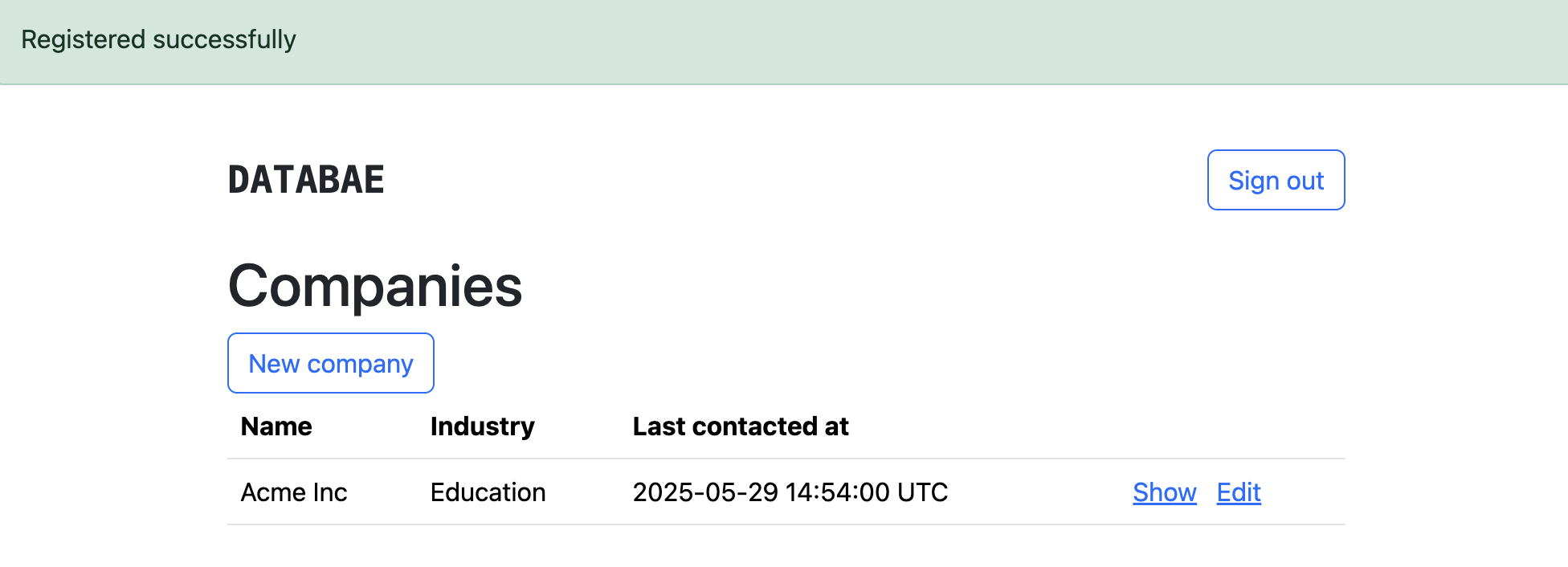
Companies
| Name | Last contacted at | <% @companies_to_contact.each do |company| %>
|---|---|
| <%= company.name %> | <% if company.last_contacted_at.present? %> <%= company.last_contacted_at.strftime("%B %d, %Y") %> <% else %> Not contacted yet <% end %> |
<%= notice %>
<% content_for :title, "Companies" %>| Name | Industry | Last contacted at | <% @companies.each do |company| %> <%= render company %> <% end %> <%= link_to "New company", new_company_path, class: 'btn btn-outline-primary' %> ``` And update our company row partial: ```erb <%# views/companies/_company_.html.erb %> |
|---|---|---|---|
| <%= company.name %> | <%= company.industry.name %> | <%= company.last_contacted_at %> | <%= link_to 'Show', company_path(company), class: 'px-2' %> <%= link_to "Edit", edit_company_path(company) %> |